
Using Proctorio to Take an Online Exam
You may have a class that requires you to take an online proctored exam. If you do, you will take those exams using Proctorio through Canvas at University of Pittsburgh. Proctorio is an easy-to-use system that operates within your web browser, allowing you to take your exam anywhere, at any time, while still being proctored. Proctorio is a remote proctoring service software that works within your web browser to monitor test takers to ensure academic integrity and eliminate online cheating. Proctorio may record through your webcam, your screen, or other actions during the exam session and share that information with your instructor. Only your instructor will have access to these recordings. Just like a traditional class exam, any decision regarding the suspicion of cheating is determined and handled by the instructor.
- To use Proctorio to take a proctored test, you must have the Proctorio software extension installed on your browser.
- If you do not have the extension installed when you try to take a proctored exam, you will be prompted to go the installation page. It is important that you give yourself enough time to install the Proctorio software before you start your exam. Don’t wait until the last minute to start your test if you have not set up the software.
- You must be using Google Chrome or a Chromium web browser such as Brave. You will not be able to take a proctored exam using any other browser.
- Proctorio does not work with mobile devices (phone or tablet). You need to be using a desktop PC, laptop or Chromebook.
- Once the Proctorio Extension has been enabled, you will see a small gray shield in the upper right corner. When you are logged into a Proctorio-enabled course in University of Pittsburgh's Canvas system, this connection provides you with access to live chat and to Proctorio support resources (via the Proctorio Help and Support Center) which is available 24 hours, 7 days a week, all year long.
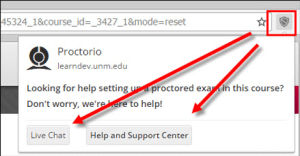
For complete installation instructions, please go to the Proctorio Help and Support Center using the link in your browser extension Additional Proctorio support is also available at:
Note: For specific course and test proctoring instructions, please contact your instructor.
Getting Started Steps
- To take a proctored exam, you will need to use a browser that works with Proctorio. Proctorio recommends:
Note: To avoid possible issues, it is also recommended that you update your browser to the latest version to ensure compatibility with the Proctorio software.
- Install the Proctorio browser extension. The installation process is automatic and only needs to be done once. The extension will update automatically.
-
Take the Exam. Navigate to the Quiz page in your Canvas course and start the proctored exam issued by the instructor.
Proctorio Student Tutorial Video
FAQs
Do I need to schedule my exam?
No. Proctorio is fully automated and never requires scheduling, so you can take your exam at any time without waiting or paying a penalty.
Do I need a password to take my exam?
No. Proctorio integrates with your school's learning management system so you don't need a separate password to take a test.
Is someone watching me while I take my exam?
No. If your institution requires video, audio, or screen capture, Proctorio will store that data and provide an automated suspicion report to your instructor. No Proctorio employee has access to this data.
How do I know that my privacy is protected?
Proctorio uses zero-knowledge encryption technology that ensures your information is encrypted when it leaves your computer, is transferred, and then stored in the cloud.
Will Proctorio ever obtain or give out my personal information?
Never. Proctorio does not and cannot collect any unencrypted personally identifying information on any user, so there's nothing to give to third parties.
Who can view my exam recordings?
Only authorized school officials can unlock and view the exam recordings, not Proctorio. Additionally, our state-of-the-art, double-encryption technology ensures that all of your exam data is safe from hackers.
Additional Support Resources
You can send an email to support@proctorio.com for additional support.